


Download EMC Retrospect Express HD – Easy Backup Tool for Windows
Why You Need a Reliable Backup Solution – Overview of EMC Retrospect Express HD
In today’s digital world a single corrupted file or a failed hard‑drive can erase years of work in seconds. The anxiety that follows a lost document, a missing photo album, or a broken system is what drives many users to search for a trustworthy backup solution. EMC Retrospect Express HD positions itself as the “set‑and‑forget” backup wizard for Windows PCs that want simplicity without sacrificing safety.
Designed as a step‑by‑step assistant, the software guides you from the very first backup to a fully automated schedule that runs in the background. Its core promise is to let you create a reliable restoration point without digging through complex menus or learning a new language. By using incremental backups, the tool copies only new or modified files after the initial full backup, dramatically reducing the time and storage space required for each subsequent run.
The first backup may take a while, but it establishes a solid baseline that can be restored when disaster strikes. While the interface is intentionally streamlined for novice users, power users will quickly recognize that the lack of deep‑filtering options is a trade‑off for speed and ease of use. If you have been postponing backups because the process feels intimidating, EMC Retrospect Express HD removes that barrier, giving you a free, secure way to protect your data today.
Core Features That Make EMC Retrospect Express HD Stand Out
- Wizard‑Driven Setup: A clear, multi‑step wizard walks you through selecting backup type, schedule, and source folders, eliminating guesswork.
- Incremental Backups: After the initial full backup, only changes are saved, saving disk space and reducing backup windows.
- Automatic Scheduling: Choose daily, weekly, or monthly runs; the program runs silently in the background.
- File‑Level Restore: Browse any backup set and restore individual files or entire folders with a single click.
- Compression & Encryption: Backups are compressed to save space and can be encrypted for added security (AES‑256).
- External Drive Support: Easily direct backups to USB drives, external HDDs, or network shares.
- System Restoration Point: The first backup creates a boot‑able system image that can be used for full OS recovery.
- Free for Personal Use: The Express HD edition is offered at no cost, making it accessible for home users and small offices.
Installation, Configuration, and Everyday Use – A Walkthrough
Getting started with EMC Retrospect Express HD is deliberately straightforward. First, download the installer from the official EMC website. The file is a compact .exe that weighs under 25 MB, making the download quick even on slower connections. Run the installer, accept the end‑user license agreement, and let Windows handle the typical installation steps—selecting a destination folder (the default works for most users) and creating a desktop shortcut. Once installed, launch the program; the wizard automatically opens on first run.
Step 1 – Choose Backup Type: You can pick between a “Full System Backup” (captures OS, programs, and data) or a “File‑Only Backup” (focuses on user‑selected folders). For most home users, the File‑Only option is sufficient and faster.
Step 2 – Select Source Folders: A familiar Windows Explorer view lets you tick the directories you want to protect—Documents, Pictures, Desktop, or any custom folder. The wizard also offers a quick‑select for common user folders.
Step 3 – Destination & Storage: Choose a local external drive, a mapped network share, or a secondary internal partition. The software validates the target’s free space and suggests compression levels to fit within your storage budget.
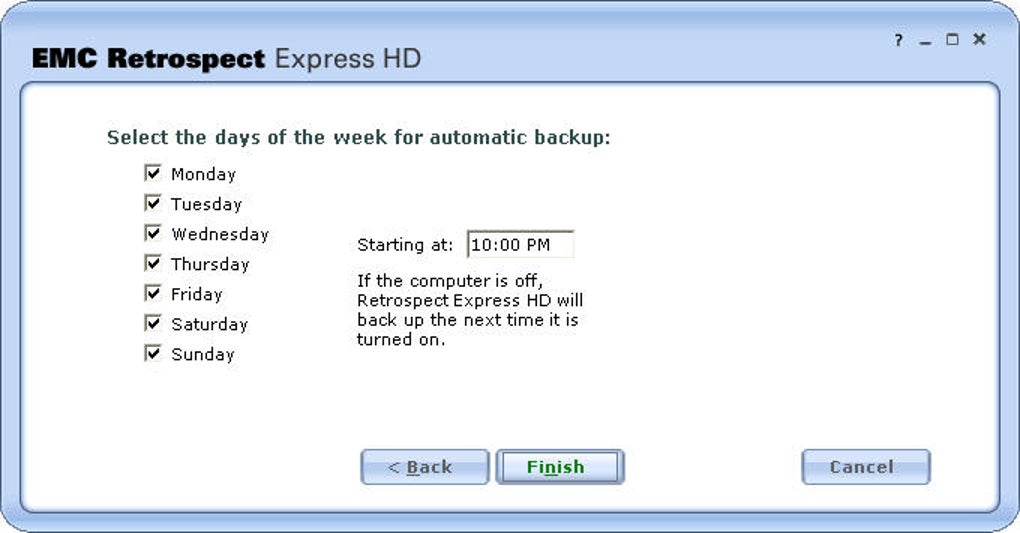
Step 4 – Scheduling: Pick a frequency—daily at a specific time, weekly on a chosen day, or monthly. You can also enable “Run when idle” so the backup only starts when the computer isn’t in active use, ensuring performance isn’t impacted.
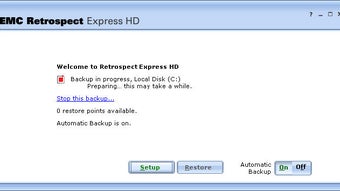
Step 5 – Review & Launch: The wizard presents a summary of all choices. Confirm, and the first backup begins automatically. Depending on the amount of data, this may take from several minutes to a few hours. A progress bar, estimated time, and log file keep you informed.
After the initial run, the program returns to the system tray. From there you can access the backup history, initiate a manual backup, or restore files with a double‑click. The interface remains minimal—no cluttered menus—so daily interactions are quick and painless.
Pros, Cons, Compatibility, FAQ and Final Verdict
System Compatibility
EMC Retrospect Express HD is built for Microsoft Windows platforms. Officially supported operating systems include Windows 7 (64‑bit), Windows 8.1, Windows 10, and Windows 11 (all 64‑bit editions). The installer will refuse to run on 32‑bit systems, ensuring optimal performance on modern hardware.
Pros & Cons
- Pros:
- Intuitive wizard eliminates the learning curve.
- Incremental backups save storage and time.
- Free for personal use—no hidden fees.
- Built‑in compression and AES‑256 encryption.
- Low system impact; runs silently in the background.
- Cons:
- Lacks advanced filtering (e.g., file‑type exclusions).
- Scheduling options are basic; no granular “run every X hours.”
- No native cloud integration; backups are limited to local or network drives.
- Only Windows support—no macOS, Linux, Android, or iOS versions.
Frequently Asked Questions
Is EMC Retrospect Express HD really free?
Yes, the Express HD edition is offered at no cost for personal and non‑commercial use. There is a paid “Professional” version with additional features, but the free edition includes everything most home users need.
Can I restore a single file without reinstalling the whole backup?
Absolutely. The program provides a file‑level browser that lets you locate and restore individual files or folders directly from any backup set.
How much disk space does an incremental backup require?
Only the data that has changed since the previous backup is stored. In practice, most users see a 5‑15 % increase in storage per incremental run, depending on the amount of new or edited files.
Does the software support backing up to external USB drives?
Yes, you can select any attached USB drive, external SSD, or HDD as the backup destination. The wizard automatically detects connected removable media.
Is there any way to encrypt my backups?
EMC Retrospect Express HD includes AES‑256 encryption. You can enable it during the destination‑selection step; a password prompt will appear each time you attempt to restore data.
Final Verdict & Call to Action
EMC Retrospect Express HD delivers exactly what its name promises: a straightforward, wizard‑driven backup experience that anyone can use. While power users may miss deep filtering and cloud sync options, the trade‑off for simplicity and a zero‑price tag is more than reasonable. If you’ve been delaying backups because the process feels daunting, this tool removes that obstacle and gives you peace of mind with a reliable, incremental backup engine.
Ready to protect your data before a disaster strikes? Click here to download EMC Retrospect Express HD for free, run the wizard, and set your first backup in minutes. Your files deserve a safety net—make sure they have one today.







